

Merge fields
A merge field is a named slot on a label. Declare it once in the template, then supply a value on every conversion or print call — one design prints thousands of different labels.
Declare a merge field
Section titled “Declare a merge field”A merge field lives in the text content of a variableText, barcode, or addressBlock
component in LabelZoom XML. The content is an expression: a
double-quoted string literal in which ${name} marks a placeholder.
<component xsi:type="variableText" x="20" y="30" fontSize="10"><![CDATA["${sku}"]]></component><component xsi:type="variableText" x="20" y="60" fontSize="10"><![CDATA["Qty: ${qty} of ${total}"]]></component><component xsi:type="barcode" x="20" y="90" barcodeStyle="Code128"><![CDATA["{{sscc18}}"]]></component>Placeholders mix freely with literal text — that’s how you concatenate — and {{name}} is an
alias for ${name}. A quoted literal with no placeholder is valid too; it just prints itself.
Three rules:
- The double quotes are required. Without them the expression is rejected and the fields render blank.
- Wrap the content in
<![CDATA[ ... ]]>so quotes and braces survive XML parsing. - Only
\nand\"are escapes. Any other backslash stays a backslash.
Address blocks are the one exception to the ${...} form — see Address blocks.
Everything here describes schemaVersion v2; v1 used a bare unquoted field name and is
still read, but author new templates as v2.
Field names
Section titled “Field names”The name is taken literally and trimmed. Anything but a brace is allowed, so dots, spaces, and hyphens are legal characters in a name:
| Placeholder | JSON key it reads |
|---|---|
${sku} |
sku |
${Ship-To} |
Ship-To |
${ line qty } |
line qty |
${order.id} |
order.id |
That last row surprises people: a dot is not a path. ${order.id} reads one top-level key
whose name contains a dot — it never descends into a nested order object. Flatten your data
first.
Fields inserted from the Studio or designer UI are limited to letters, digits, and underscores. That’s the UI’s rule, not the engine’s, but staying inside it keeps a template portable.
What placeholders can’t do
Section titled “What placeholders can’t do”The syntax resembles a scripting language but isn’t one. Filling is a single pass of plain name lookup, and everything between the braces is one field name:
| Not supported | Read as the field name |
|---|---|
Nested paths — ${order.items.sku} |
order.items.sku |
Array indexing — ${items[0]} |
items[0] |
Arithmetic — ${qty * price} |
qty * price |
Functions — ${upper(sku)}, ${today()} |
upper(sku) |
Defaults or fallbacks — ${sku ?: 'N/A'} |
sku ?: 'N/A' — you get null, never the fallback |
| Date/number formatting, padding, substring | Not available |
Each unsupported form prints the literal text null, because no key by that name exists in the
payload. Two more limits:
- Concatenation works only by embedding placeholders in literal text —
"${first} ${last}". A+operator doesn’t exist, and"PO " + ${po}is rejected because the expression no longer ends in a quote. - Substitution runs once, so a value containing
${...}lands on the label verbatim.
Do the computing in your application and send finished strings.
A missing field prints null
Section titled “A missing field prints null”A placeholder naming a key you didn’t send is replaced with the four literal characters null —
not a blank, and not an error. Template "Qty: ${qty}" with data {"sku":"A-100"} prints
Qty: null.
Send every field the template declares, even when empty: {"qty":""} prints Qty: as
intended. For published templates, ?validate=true enforces this server-side.
Built-in fields
Section titled “Built-in fields”Two names are always available without being in your payload:
| Name | Value |
|---|---|
${LABEL_NUMBER} |
Index of the current label in the batch, starting at 0 |
${LABEL_COUNT} |
Total number of labels in the batch |
"Label ${LABEL_NUMBER} of ${LABEL_COUNT}" over two entries prints Label 0 of 2, then
Label 1 of 2. Add your own field for a 1-based counter.
Merge fields in a ZPL template
Section titled “Merge fields in a ZPL template”${...} is LabelZoom syntax, not ZPL — a Zebra printer won’t understand it in a ^FD. Instead,
LabelZoom recognizes the two placeholder conventions WMS and ERP systems already emit into ZPL
and converts them as it reads the label:
^FO50,50^A0N,30,30^FDPO Number: ~cponum,20~^FS^FO50,100^A0N,30,30^FD{BFFNAME}^FS~name,len~ gives a name and the field’s maximum length; {NAME} is a bare braced name. Those
become merge fields cponum and BFFNAME. Field data with neither pattern is static text and
ignores whatever you send.
Two ZPL features look like merge fields and aren’t:
^FNdoesn’t create one. A^DFformat recalled with^XFresolves its^FNvalues while the label is read, giving a field fixed for every copy.^SNisn’t incremented. Only its starting value is read, printing as static data. Generate sequences yourself, or use${LABEL_NUMBER}.
Authoring in Studio and the web designer
Section titled “Authoring in Studio and the web designer”Merge fields are derived from the label, never declared separately — no field list to
maintain, no “is this variable?” switch. Place a text or barcode element and type literal text
with ${field} tokens in it.
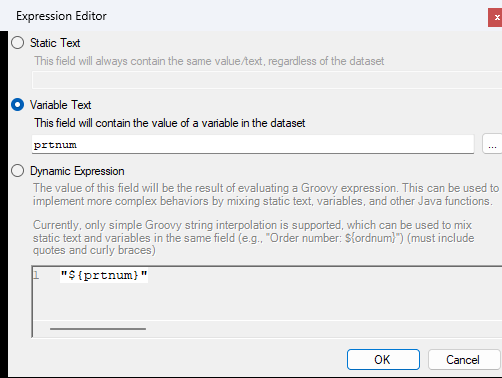
In LabelZoom Studio, the Expression Editor offers Static Text, Variable Text (type or pick a field name), and Dynamic Expression for the raw form.
In the web designer, type into the Content box on the property panel or use Insert field; the Data tab lists every field the label uses.
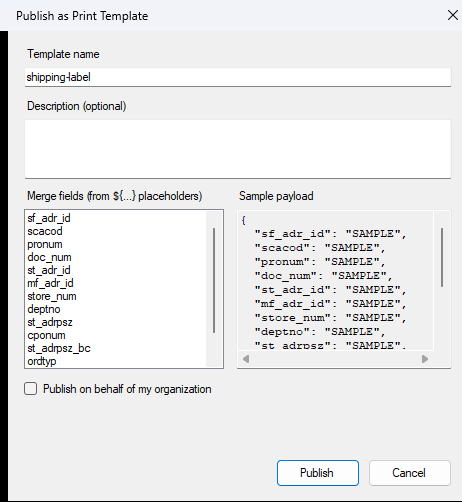
Publishing scans the label, and the names it finds become the template’s integration contract —
shown at publish time and returned as mergeFields. Your payload keys must match that list.
Supplying values at runtime
Section titled “Supplying values at runtime”Endpoints differ in what they accept, which is the most common source of a confusing 400:
| Endpoint | Accepts | One label per |
|---|---|---|
POST /api/v2/convert/{source}/to/{target} |
a JSON array only | array entry |
POST /api/v2/labels/{labelId}/generate |
a JSON array only | array entry |
POST /api/v3/templates/{id}/convert |
an object or non-empty array of objects | object |
POST /api/v3/printers/{printerId}/templates/{templateId}/print |
an object or non-empty array of objects | object |
An object or scalar where an array is required returns
400 params.data must be a JSON array, with one entry per output label.
Conversion API
Section titled “Conversion API”Send the template as the request body and the values in data:
curl -X POST "https://api.labelzoom.com/api/v2/convert/zpl/to/pdf" \ -H "Authorization: Bearer YOUR_API_KEY" \ -H "Content-Type: text/plain" \ --data-binary @template.zpl \ --url-query 'params={"data":[{"sku":"A-100"},{"sku":"A-101"}]}' \ --output labels.pdfdata also works as a flat query parameter, ?data=[{"sku":"A-100"}], which wins where the two
overlap — though the official SDKs always emit the single
params object, and that’s the form to prefer.
Omitting data doesn’t leave placeholders intact: the label is still filled, with one empty
record, so everything resolves to null.
See Conversion parameters for the
rest of params and the --url-query caveat, and
Multi-label jobs for per-format batch
behavior.
Stored labels
Section titled “Stored labels”For a label stored in your account, reference it by id and put the data in the body:
curl -X POST "https://api.labelzoom.com/api/v2/labels/{labelId}/generate?copies=2&dpi=300" \ -H "Authorization: Bearer YOUR_API_KEY" \ -H "Content-Type: application/json" \ -d '[{"sku":"A-100","qty":"12"}]' \ --output label.zpl| Parameter | Default | Notes |
|---|---|---|
format |
zpl |
Printer language to generate |
copies |
1 |
Adds a print-quantity command to the output; minimum 1 |
dpi |
203 |
Minimum 1 |
Content-Type must be application/json or the call returns 415. The response is the printer
data stream as text/plain.
Published print templates
Section titled “Published print templates”Once a design is published you never send label code again — only values. Both endpoints take one object for a single label or an array for a batch, and the response shape mirrors the request.
Render a filled template without printing it:
curl -X POST "https://api.labelzoom.com/api/v3/templates/{templateId}/convert?target=pdf" \ -H "Authorization: Bearer YOUR_API_KEY" \ -H "Content-Type: application/json" \ -d '{"orderNumber":"SO-1001","sku":"A-100"}' \ --output label.pdfAn object returns raw label bytes with the format echoed in an X-LZ-Format header, and
?target= overrides the template’s default. An array returns JSON, so one response carries the
batch:
{ "labels": [ { "format": "pdf", "contentType": "application/pdf", "base64": "JVBERi0..." }, { "format": "pdf", "contentType": "application/pdf", "base64": "JVBERi0..." } ]}Print a filled template to one of your cloud printers:
curl -X POST "https://api.labelzoom.com/api/v3/printers/{printerId}/templates/{templateId}/print?validate=true" \ -H "Authorization: Bearer YOUR_API_KEY" \ -H "Content-Type: application/json" \ -H "Idempotency-Key: SO-1001" \ -d '{"orderNumber":"SO-1001","sku":"A-100"}'{ "jobId": "9f1c7e2a-4b30-4d6e-8a11-5c2f9d4e7b83", "status": "dispatched", "copies": null }The call returns 202. An array returns { "jobs": [ ... ] }, each job deriving its own
idempotency key from yours, so a batch stays safe to retry whole. Reusing a key with different
merge data, a different printer or template, or a different copies is refused with 422
rather than replayed — see Idempotency. The target
format comes from the printer, so one template feeds a ZPL printer and a PDF-capable one
unchanged.
Print several copies by adding copies, a whole number from 1 to 9999, which sends the
job to the printer that many times. To print 25 price tags for one product:
curl -X POST "https://api.labelzoom.com/api/v3/printers/{printerId}/templates/{templateId}/print?validate=true&copies=25" \ -H "Authorization: Bearer YOUR_API_KEY" \ -H "Content-Type: application/json" \ -d '{"sku":"A-100","description":"Widget, blue","price":"4.99"}'{ "jobId": "4e8b1d6f-2a9c-4f3e-b7d0-6c1a5e9f8b24", "status": "dispatched", "copies": 25 }The tag prints 25 times as one job. A print quantity the template was designed with multiplies —
a template that prints 2 of each label, sent with copies=25, prints 50 — so design a template
meant for copies to print one. Leaving copies off sends the job once, and the response then
reports "copies": null. In a batch, every entry’s job is sent that many times. See
Printing copies for the details, including the
422 returned when a Print Agent needs updating.
Leave ?validate=true on. It checks each payload against the template’s merge fields
before rendering, returning 422 instead of printing a label with null on it — index
identifies the entry in a batch:
{ "message": "Payload is missing required fields", "problems": [{ "index": 0, "missing": ["sku"] }]}Address blocks
Section titled “Address blocks”An addressBlock formats a postal address into the right number of lines for its country, so
it takes a whole address rather than one string. Its content is a bare field name — no
quotes, no ${}:
<component xsi:type="addressBlock" x="20" y="200" fontSize="10" useLocalizedAddressFormat="true" showContactName="true"><![CDATA[ship_to]]></component>The matching key holds a nested object. All twelve keys are optional; anything else is ignored:
[ { "sku": "A-100", "ship_to": { "name": "ACME Corp", "honorific": "Ms.", "first_name": "Dana", "last_name": "Reyes", "line1": "1 Main St", "line2": "Suite 400", "line3": "", "district": "", "city": "Austin", "state": "TX", "zip": "78701", "country": "US" } }]Nested objects mean nothing outside an address block: read by an ordinary ${...} placeholder
one yields an internal identifier, and an array value flattens to an empty string.
Troubleshooting
Section titled “Troubleshooting”| Symptom | Cause |
|---|---|
| Every variable field and barcode is blank | The expressions aren’t valid — usually missing the surrounding double quotes. Filling is skipped. |
A field prints null |
No key of that name was in the payload. Check spelling and case, and remember a dot is part of the name. |
A field prints null, and its name contains ?: or an operator |
Fallbacks and expressions aren’t evaluated; the whole body is one field name. |
400 params.data must be a JSON array |
An object or scalar was sent where an array is required. |
400 Request body is required but Content-Length was 0 |
The label was moved into the query string, usually by curl’s --get. Use --url-query. |
415 from /api/v2/labels/{id}/generate |
Content-Type wasn’t application/json. |
422 Payload is missing required fields |
validate=true caught a missing key. The problems array names it. |
422 with code idempotency_key_reused from a template print |
The Idempotency-Key was used before with different merge data, printer, template, or copies. Send a new key for a new print. |
| The data is ignored entirely | The source is ZPL whose ^FD data has no ~name,len~ or {NAME} placeholder, so the fields are static. |
| Only one label came back from a batch | Image and XML targets return only the first label. See Multi-label jobs. |
See also
Section titled “See also”- Conversion parameters — the full
paramsobject, includingdata - Cloud Print API — printers, jobs, and agents
- Supported formats — source/target matrix and multi-label behavior
- n8n integration — fill and print templates from a workflow
- Errors — status codes and retry guidance